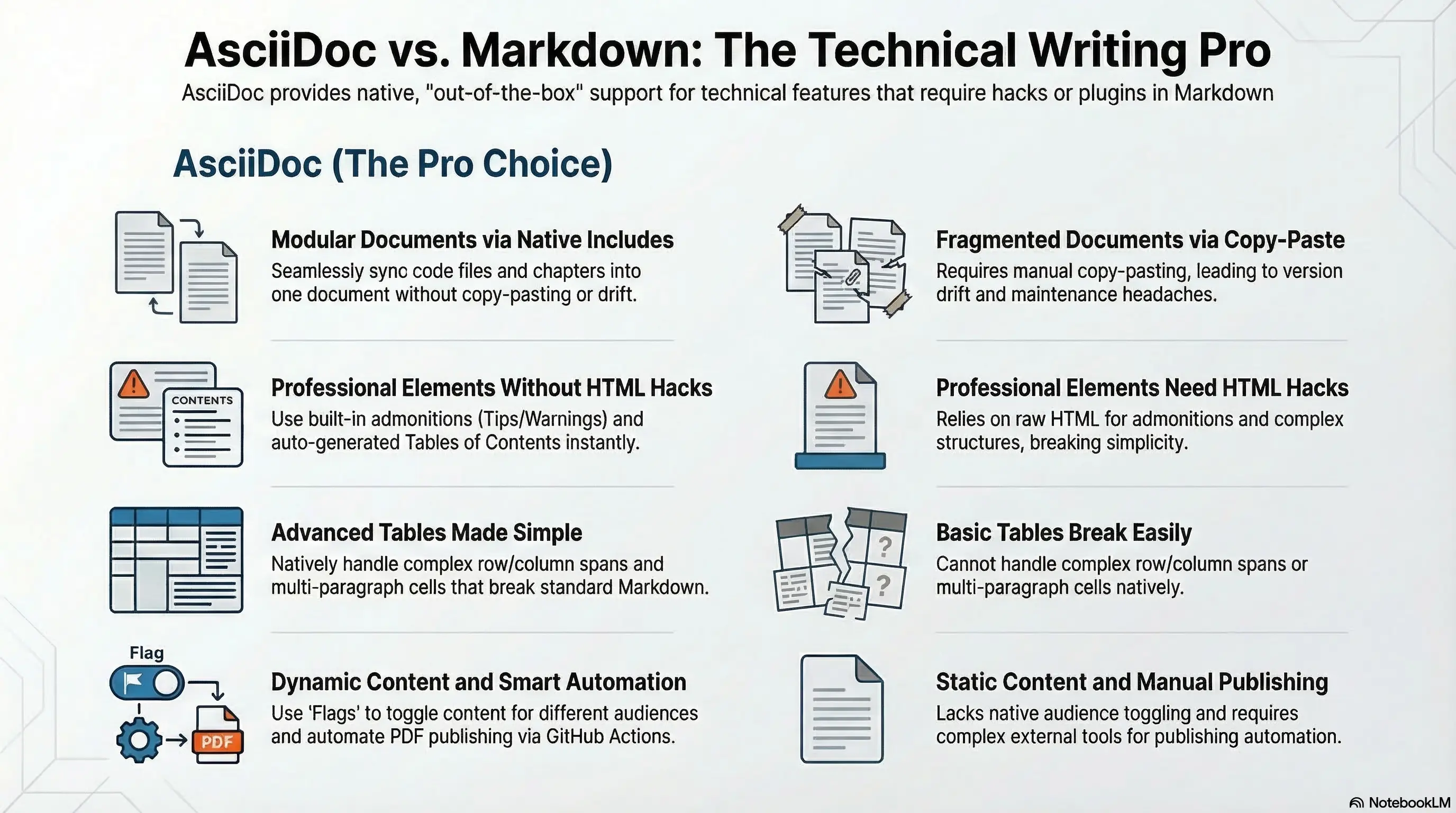
Let me be clear: AsciiDoc is objectively better than Markdown for technical writing. Not “better for some use cases” or “worth considering.” Just better.
Here’s the thing: Markdown was designed for quick HTML formatting. AsciiDoc was designed for technical documentation. And once you start writing anything longer than a single page, that difference becomes impossible to ignore.
What Makes AsciiDoc Special
AsciiDoc has native support for everything technical writers actually need. No extensions. No HTML hacks. No “well, technically you can do this with a plugin.” It just works, and it works beautifully.
Modular Documents: Includes That Actually Work
Writing a book? Long documentation? You want to split it into sections.
Markdown has no standard way to do this. Every tool invents its own include syntax.
AsciiDoc:
= My Book

include::chapters/introduction.adoc[]

include::chapters/chapter-01.adoc[]

include::chapters/chapter-02.adoc[]

include::appendix/glossary.adoc[]
You can even include specific sections, include code files, and conditionally include content with flags. Need to show code examples? Include them directly from your actual source files:
[source,python]
----
include::src/examples/hello.py[]
----
Your documentation stays in sync with your code automatically. Change the script, and the documentation updates. No copy-paste. No drift. It’s designed for modularity from the ground up.
Admonition Blocks: Built-in, Not Bolted-on
This is one of my favorite features. Need to add a tip? A warning? A note? In Markdown, you’re stuck with blockquotes or raw HTML. Maybe you’ll find some custom Markdown flavor with its own syntax.
AsciiDoc has this built right in:
TIP: This is a tip that will render beautifully in every output format.

WARNING: This is a warning with proper semantic meaning.

NOTE: You can include *formatting*, code blocks, and even lists inside these.

IMPORTANT: No HTML hacks required.

CAUTION: This just works.
These render with proper icons, colors, and semantic HTML. No plugins. No custom CSS classes. Just native support for what technical writers actually need.
Tables That Actually Work
Ever tried to create a complex table in Markdown? It’s frustrating. Multi-paragraph cells? Column spans? Double headers? You’ll quickly hit walls.
AsciiDoc tables handle all of this elegantly:
[cols="1,2,1"]
|===
|Feature |Markdown |AsciiDoc

|Basic tables
|Yes
|Yes

|Column spanning
|No
|Yes

|Row spanning
|No
|Yes

|Multiple paragraphs in cells
|No
|Yes

|Complex formatting inside cells
|Sort of, with HTML
|Yes, natively

|Double headers (row + column)
|No
|Yes
|===
You can put code blocks in cells. You can have lists in cells. You can span rows and columns. The syntax actually makes sense. And it works everywhere, not just in your specific Markdown processor.
Table of Contents: Set It and Forget It
Remember manually maintaining table of contents in Markdown? Watching them drift out of sync? Hunting for the right plugin?
In AsciiDoc, you literally just type this:
:toc:
:toclevels: 3
Done. You now have an automatically generated, properly nested table of contents. It updates when you change headings. It includes anchor links.
Flags and Conditional Content
Need to maintain multiple versions of a document? Different outputs for different audiences?
ifdef::instructor[]
Here are the answers to the exercises.
endif::[]

ifndef::public-release[]
Internal notes and discussion points.
endif::[]
You can toggle entire sections on and off with build flags. Try doing that in Markdown without maintaining multiple files.
Full Control Over Themes and Layout
Here’s where AsciiDoc really shines for professional work: you have complete control over your document’s appearance.
Need to create corporate documentation with your company’s branding? You can build custom themes that control everything. Colors, fonts, sizes, headers, footers, front covers, back covers, even the title page layout.
Want your PDFs to look exactly like your official corporate templates? You can do that. The theming system is powerful enough to match any style guide, and once you’ve built a theme, it’s reusable across all your documents.
Try doing that with Markdown. Every tool has its own theming system (if it has one at all), and you’ll spend more time fighting with CSS hacks than actually writing.
No More HTML Hacks
Here’s something I love: I haven’t written a single HTML tag in my AsciiDoc documents. Not one.
In Markdown, whenever you need something advanced (complex tables, custom layouts, sidebars) you drop into raw HTML. At that point, you’re not really using Markdown anymore. You’re using HTML with some Markdown sprinkled in.
AsciiDoc just has the features you need, natively.
Automated Publishing with GitHub Actions
Here’s a game-changer: you can set up a GitHub Action that automatically regenerates your PDFs whenever you push changes to your AsciiDoc files.
# .github/workflows/build-docs.yml
name: Build Documentation
on: [push]
jobs:
  build:
    runs-on: ubuntu-latest
    steps:
      - uses: actions/checkout@v2
      - name: Build PDF
        uses: asciidoctor/docker-asciidoctor@latest
        with:
          args: asciidoctor-pdf book.adoc
      - name: Upload PDF
        uses: actions/upload-artifact@v2
        with:
          name: documentation
          path: book.pdf
Your documentation stays in sync automatically. Every commit triggers a fresh build. No manual export steps. No “oops, I forgot to regenerate the PDF.”
Real Examples Coming Soon
I’m going to share more real-world examples from my own technical writing projects (books, documentation, and tutorials) where AsciiDoc’s power made the difference. Stay tuned.
The Bottom Line
If you’re writing anything longer than a single page in your IDE of choice, I genuinely think AsciiDoc is worth exploring.
I’m not saying Markdown is bad. It’s perfect for READMEs and quick notes. But for technical writing? For books, documentation, tutorials? AsciiDoc gives you everything you need without the workarounds.
No more fighting with Markdown’s limitations. No more cobbling together extensions. No more HTML hacks. Just clean, semantic markup that produces beautiful output.
It’s what Markdown would be if it were designed for serious technical writing from the start. Give it a try. I think you’ll love it as much as I do.