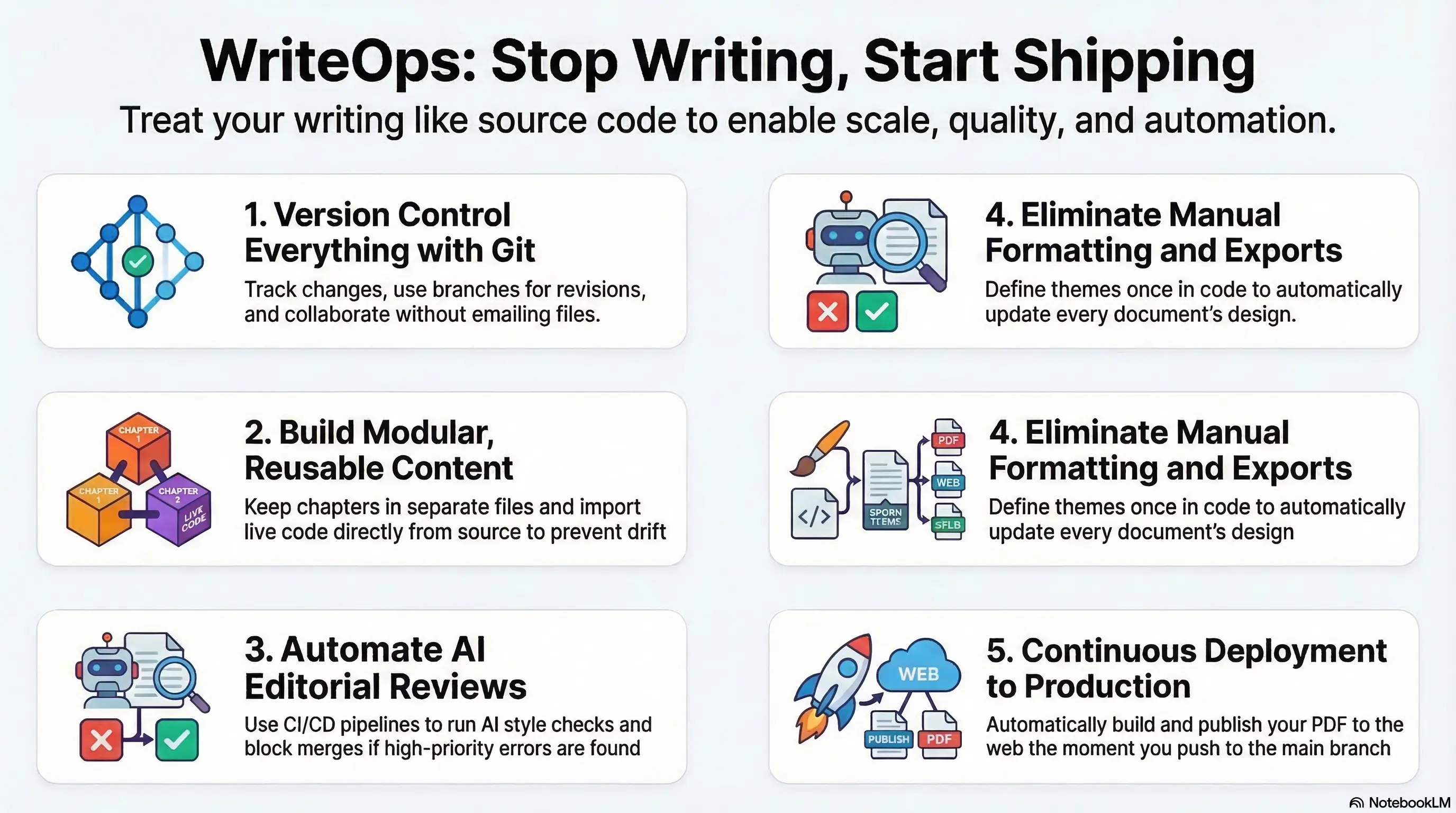
Software developers have spent decades perfecting their workflows. They use version control. They automate everything. They run tests on every commit. They deploy with a single command.
Writers are still manually exporting PDFs.
This is WriteOps: applying DevOps principles to technical writing. And if you’re writing anything longer than a blog post, you need it.
The Problem with Traditional Writing Workflows
Here’s what the typical technical writing workflow looks like:
- Write in Word or Google Docs
- Manually format everything
- Copy-paste code examples from your IDE
- Export to PDF
- Email it to someone for review
- Get feedback in comments
- Make changes
- Re-export the PDF
- Hope you didn’t break the formatting
- Repeat
This is insane. We have better tools. We know better patterns. We just haven’t applied them to writing.
The WriteOps Approach
WriteOps treats your writing like code. Because it is code. It’s source material that compiles into different outputs.
Here’s what a WriteOps workflow looks like:
Version Control Everything
Your book lives in Git. Every chapter is a separate file. Every change is a commit. Every major revision is a branch.
You can see exactly what changed between versions. You can roll back mistakes. You can work on multiple chapters in parallel. You can collaborate without emailing files back and forth.
git log --oneline
444e14c Fix typo in Chapter 3
477d55d Add section on error handling
ae5b129 Restructure Chapter 2 introduction
0083c46 Complete first draft of Chapter 4
This is how software works. This is how writing should work.
Modular Content
Your book is modular. Each chapter is a file. Common sections are reusable. Code examples are imported from actual source files.
= My Book

include::chapters/preface.adoc[]

include::chapters/chapter-01.adoc[]

include::chapters/chapter-02.adoc[]

include::chapters/appendix.adoc[]
Want to include code? Import it directly:
[source,python]
----
include::examples/hello.py[]
----
Your code examples stay in sync with your actual code. No copy-paste. No drift.
Automated Formatting and Themes
Stop manually formatting. Define your theme once (colors, fonts, headers, footers, cover pages)and apply it consistently across all your documents.
# theme.yml
page:
  size: A4
  margin: [0.75in, 1in]
font:
  catalog:
    heading:
      family: Helvetica
    body:
      family: Georgia
heading:
  font-color: #333333
Change your corporate image? Update the theme file. Every document updates automatically.
Continuous Integration Pipeline
Every time you push a commit, a CI/CD pipeline runs an AI-powered editorial review using the Claude API or OpenAI.
Here’s the actual prompt the agent receives:
You are an expert editor reviewing a chapter written in AsciiDoc format.

Perform a **COMPREHENSIVE editorial review** covering all aspects:

## 1. Spelling & Grammar
- Flag every misspelled word with the correct spelling
- Identify grammatical mistakes, tense inconsistencies, subject-verb disagreement
- Find sentence fragments or incomplete thoughts

## 2. Formatting Advisor
Suggest improvements for AsciiDoc formatting:

**Admonitions**: Recommend when to use:
- `[NOTE]` - Supplementary information readers should know
- `[TIP]` - Best practices and helpful advice
- `[IMPORTANT]` - Critical information that must not be missed
- `[WARNING]` - Potential problems or gotchas
- `[CAUTION]` - When readers need to proceed carefully

**Code Blocks**: Check for:
- Proper `[source]` attributes for code listings
- Missing or incorrect language specification
- Code blocks that should use examples with titles
- Inline code that should be in blocks

**Examples**: Suggest using `.Example N: Title` blocks for:
- Step-by-step demonstrations
- Complete code samples with context
- Multi-part explanations

**Headings**: Verify:
- Consistent heading hierarchy (===, ====, =====)
- No skipped levels
- Clear, descriptive heading text

**Lists & Tables**: Check formatting of bulleted/numbered lists and tables

## 3. Consistency Checker
Track and flag inconsistencies:
- **Terminology**: Inconsistent terms (e.g., "data engineer" vs "Data Engineer", "API" vs "api")
- **Voice**: Shifts between you/we/I
- **Tense**: Past vs present tense shifts
- **Style**: Formatting inconsistencies (bold, italics, code)
- **Capitalization**: Inconsistent product/tool names
- **Contractions**: Flag ALL contractions (you're → you are, don't → do not, can't → cannot, etc.)
- **Em dashes**: Flag ALL em dashes (—) and suggest alternatives (commas, semicolons, or separate sentences)

## 4. Writing Style
- Passive voice usage (suggest active alternatives)
- Wordiness or redundancy
- Unclear or ambiguous phrasing
- Overly complex sentences
- Missing transitions between sections
- Jargon without definitions
- **AI-generated patterns**: Flag content that feels generic, formulaic, or AI-written:
  * Overuse of phrases like "it's worth noting", "it's important to", "dive deep", "delve into"
  * Lists that are too generic or lack specific examples
  * Overly formal or stilted language that lacks human voice
  * Repetitive sentence structures
  * Vague statements without concrete details
  * Corporate-speak or buzzwords without substance

## 5. Content Quality
- Factual inaccuracies (where verifiable)
- Logical inconsistencies
- Incomplete explanations
- Missing context or prerequisites
- Unsupported claims

## Output Format

For each issue, provide:
- **Location**: Section or quoted text
- **Type**: Issue category
- **Problem**: What's wrong
- **Suggestion**: How to fix it
- **Priority**: High/Medium/Low

Organize by priority, with High priority issues first.

If there are NO issues, say "No issues found - excellent work!"
The CI pipeline sends your changed files to the LLM, gets back the review, and blocks the merge if any High priority issues are found.
# .github/workflows/writeops.yml
name: WriteOps Pipeline
on: [push, pull_request]

jobs:
  editorial-review:
    runs-on: ubuntu-latest
    steps:
      - uses: actions/checkout@v2

      - name: AI Editorial Review
        env:
          ANTHROPIC_API_KEY: ${{ secrets.ANTHROPIC_API_KEY }}
        run: |
          # Send changed .adoc files to Claude API with the review prompt
          python scripts/ai-review.py --files "$(git diff --name-only HEAD~1 | grep '.adoc$')"

      - name: Check for Critical Issues
        run: |
          # Parse the review output
          # If High priority issues found, exit 1 to fail the build
          if grep -q "Priority: High" review-output.json; then
            echo "Critical issues found - merge blocked"
            exit 1
          fi

      - name: Build PDF
        run: asciidoctor-pdf book.adoc

      - name: Upload Artifacts
        uses: actions/upload-artifact@v2
        with:
          name: book-and-review
          path: |
            book.pdf
            review-output.json
If critical issues are found, the pipeline fails. The merge is blocked. You fix it before it gets to production.
Just like code.
This is how you get consistent, high-quality writing at scale. An AI agent reviews every single change, catches mistakes immediately, and enforces your style guide automatically.
Pre-commit Hooks
Formatting issues? Catch them before they hit the repo.
# .pre-commit-config.yaml
repos:
  - repo: local
    hooks:
      - id: remove-trailing-whitespace
        name: Remove trailing whitespace
        entry: sed -i 's/[[:space:]]*$//'
        language: system

      - id: remove-empty-lines
        name: Remove excessive empty lines
        entry: ./scripts/format-adoc.sh
        language: system

      - id: check-formatting
        name: Check AsciiDoc formatting
        entry: asciidoc-lint
        language: system
Every commit is clean. Every commit is consistent. No more “oops, forgot to remove those extra spaces.”
Automated Deployment
Push to main? Your PDF is automatically generated and published.
deploy:
  runs-on: ubuntu-latest
  if: github.ref == 'refs/heads/main'
  steps:
    - name: Build PDF
      run: asciidoctor-pdf book.adoc

    - name: Deploy to S3
      run: aws s3 cp book.pdf s3://my-books/latest.pdf

    - name: Create GitHub Release
      uses: actions/create-release@v1
      with:
        tag_name: v${{ github.run_number }}
        release_name: Release ${{ github.run_number }}
        body: Automated release
No manual export. No “forgot to regenerate the PDF.”
Fully Containerized
Everything runs in Docker. Your entire writing environment is reproducible. Anyone can build your book. Any machine can run your pipeline. No “works on my machine” problems.
docker run -v $(pwd):/documents writeops/book-builderThe Future of Technical Writing
Software development went through this transformation decades ago. Manual builds became automated. Manual testing became CI/CD. Emailing code became pull requests.
Treat your writing like the valuable source material it is. Version control it. Test it. Automate it. Deploy it.
Stop manually exporting PDFs. Start shipping text like a developer.
This is the WriteOps manifesto. If you’re a technical writer, documentation engineer, or author working with complex documents, this is for you. Join the movement. Automate your writing workflow.